
What’s the difference between the different Search buttons on the XWord Info Finder page? And why is my RegEx search timing out?
Category: XWord Info features
Tips and tricks for getting the most out of XWord Info.
Fearful symmetry

Crossword grid symmetry comes in various flavors.
The 3 Rs of Finder

A real-world example demonstrating some advanced features of the XWord Info Finder Page.
Finder Page Video Tutorial
The most useful feature on XWord Info is the Finder Page. It’s easy to use for straightforward searches, but there are many deeper capabilities. This video helps you get started. The tutorial barely scratches the surface of what’s possible. To keep it to 15 minutes, I don’t even mention using $c and $v for consonants… Continue reading Finder Page Video Tutorial
Analyze your Puzzles improvements
We’ve made some improvements to the “Analyze your own puzzles” feature.
Updated: Analyze Your Own Puzzles

The XWord Info Analyze page (which also generates links for your test solvers) has been given a huge update.
Goodbye Pangram, Hello POW
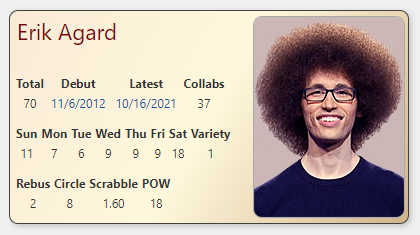
Well, you can safely ignore this post. Now that Jeff has stopped doling out POWs, I’ve gone back to counting pangrams on the baseball cards. Every NYT constructor gets what we call a Baseball Card on XWord Info. Like real baseball cards, there’s a photo and a bunch of stats only nerds care about. Until… Continue reading Goodbye Pangram, Hello POW
Tips for Debut Constructors

Constructor notes are the best part of XWord Info. Here’s how you can make your notes shine.
Cheating at Bee with RegEx
We often get questions about using RegEx on XWord Info, most of which I can’t answer, but an intriguing question arose recently. Can RegEx be used to find NYT Spelling Bee words? The short answer is that, yes, we you can filter words in our lists that match Bee rules, but you end up with… Continue reading Cheating at Bee with RegEx
Word List Updates
Jeff Chen regularly updates the XWord Info word lists. He’s just uploaded a large batch.